

In an effort to make accounts more secure many hosts are implementing mandatory 2-factor authentication and encouraging users to share access with delegation instead of sharing login credentials. In this post we’ll run through how to provide delegate access to your WPEngine account. For a broader view of keeping your site healthy and secure, you can also review our DIY hub, Your Complete Guide to Website Maintenance & DIY Tools.
Want us to handle this for you?
If you’d rather not deal with technical settings or risk breaking something, our team can take care of it quickly and safely.
Log into your WPEngine account
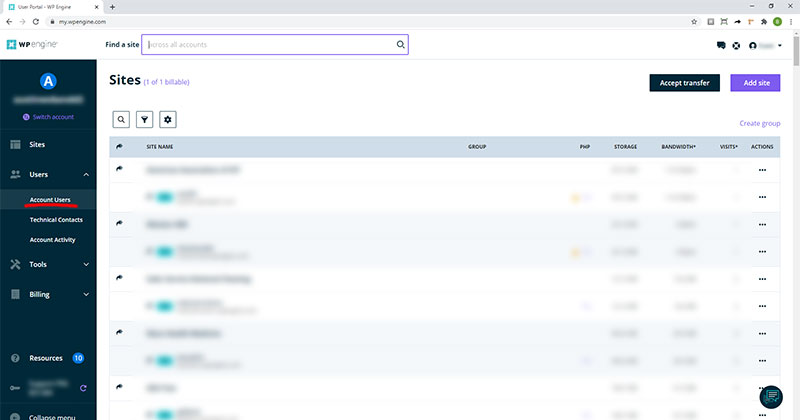
Create a WPEngine account or log in at https://wpengine.com/. Once logged into your dashboard, click Users in the left sidebar and select Account Users (Fig. 1). If you’re comparing hosts or planning a future migration, you might also find our article helpful on why we recommend Hostinger for fast, reliable, and affordable website hosting.
Rather have this handled for you?
If you’d rather not deal with settings, permissions, or technical details, our team can take care of this quickly and safely.
- Correct setup and permissions
- Secure configuration (no password sharing)
- Clean documentation and handoff
Invite a user
On the Account Users page click the Invite account user button in the top right corner of the page (Fig. 2). Not sure how this fits into your overall security setup? Our step-by-step guide to setting up iThemes Security walks through additional ways to harden your WordPress login.
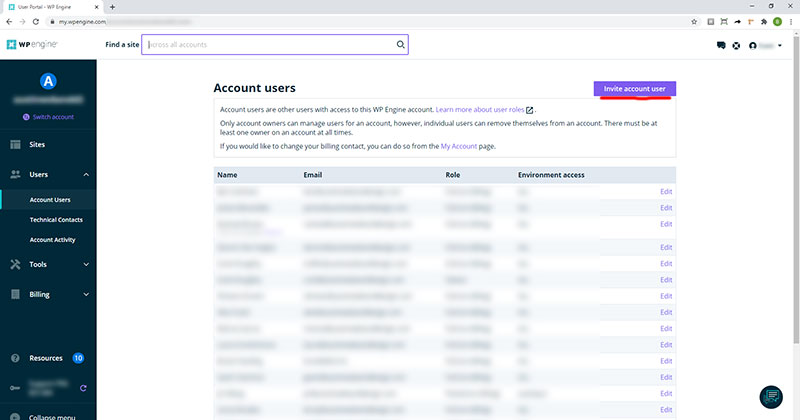
Once you click Invite account user, you’ll be directed to an Invite User page. Enter the name and email of the account you want to share access with then select the appropriate role. In most cases this will be “Full (no billing).” Once the invite gets sent out, the user you invited will need to log into their account and accept it. Then you’re all set! As a next step in tightening security, consider enabling HTTPS if you haven’t already—our guide on setting up HTTPS explains why it matters for both security and SEO.
Need help with this or anything else?
If you’d rather not deal with ongoing updates, settings, or technical issues, our team can handle fixes, support, and long-term maintenance for you.
Related Access Guides
If your WordPress site uses additional hosting, DNS, or Google services, these guides explain how to safely grant access without sharing passwords.