
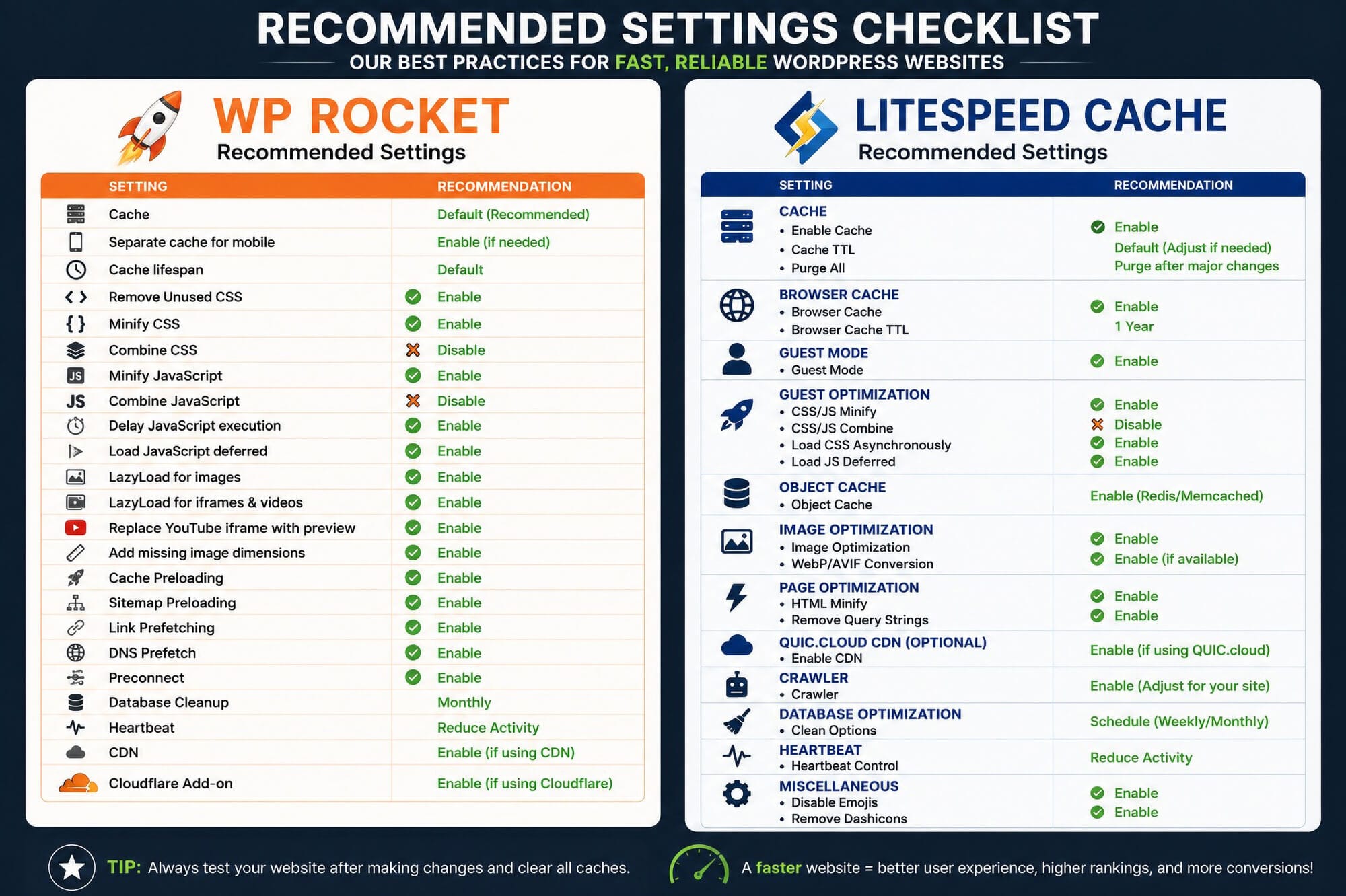
If you’ve already decided which plugin you’re using, follow our complete setup guides:
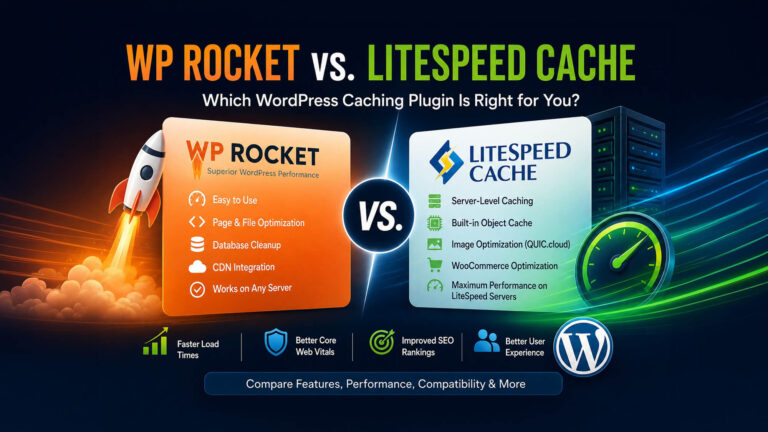
WP Rocket and LiteSpeed Cache are two of the most popular WordPress performance plugins, but they are not built the same way and they are not always the right fit for the same website. Choosing between them depends heavily on your hosting environment, server type, technical comfort level, and performance goals.
In this guide, we’ll compare WP Rocket and LiteSpeed Cache, explain the biggest differences, and help you decide which caching plugin makes the most sense for your WordPress website.
Why the Right Cache Plugin Matters
Caching is one of the most effective ways to improve WordPress performance. A properly configured cache plugin can reduce server load, improve page load times, support better Core Web Vitals, and create a smoother experience for visitors.
However, using the wrong caching plugin for your hosting environment can create conflicts, broken layouts, stale content, or missed performance opportunities. That’s why the best caching plugin is not always the most popular one. It’s the one that fits your server and website setup.
Quick Comparison: WP Rocket vs. LiteSpeed Cache
| Feature | WP Rocket | LiteSpeed Cache |
|---|---|---|
| Cost | Paid plugin | Free plugin |
| Best Server Type | Apache or Nginx | LiteSpeed Web Server |
| Server-Level Cache | No | Yes, when hosted on LiteSpeed |
| Ease of Use | Very beginner-friendly | More advanced settings |
| Page Caching | Yes | Yes |
| CSS/JS Optimization | Yes | Yes |
| Image Optimization | Via Imagify or separate tools | Via QUIC.cloud |
| Object Cache Support | Requires separate setup | Built-in Redis/Memcached support |
| CDN Support | Cloudflare, Bunny, and others | QUIC.cloud, Cloudflare, and others |
| Best For | Simplicity and broad compatibility | LiteSpeed hosting and advanced performance tuning |
How WP Rocket Works
WP Rocket is a premium WordPress caching and performance plugin designed to work on most hosting environments. It does not require LiteSpeed Web Server and can be used on Apache, Nginx, and many managed WordPress hosting platforms.
WP Rocket focuses on plugin-level optimization. It can create cached versions of pages, optimize CSS and JavaScript, lazy load images, preload cache, clean the database, and integrate with popular CDN providers.
Its biggest strength is ease of use. WP Rocket is polished, beginner-friendly, and usually delivers solid improvements without requiring a long setup process.
How LiteSpeed Cache Works
LiteSpeed Cache is different because it can integrate directly with LiteSpeed Web Server. When your hosting environment supports LiteSpeed, the plugin can use server-level caching instead of relying only on plugin-level page caching.
This is the main reason LiteSpeed Cache can perform extremely well on compatible hosting. It also includes advanced features such as object cache support, image optimization through QUIC.cloud, crawler settings, database cleanup, CDN integration, and detailed page optimization controls.
The tradeoff is complexity. LiteSpeed Cache has many settings, and enabling too many options without testing can cause display issues, JavaScript conflicts, or caching problems.
Server Compatibility Is the Biggest Difference
The most important difference between WP Rocket and LiteSpeed Cache is server compatibility.
Choose WP Rocket for Apache or Nginx Hosting
WP Rocket is usually the better choice when your website is hosted on Apache, Nginx, or a managed WordPress host that already handles its own server caching.
WP Rocket is often a good fit for websites hosted on platforms such as WP Engine, Flywheel, Cloudways, Kinsta, and many standard shared, VPS, or dedicated hosting environments.
Choose LiteSpeed Cache for LiteSpeed Hosting
LiteSpeed Cache is usually the better choice when your hosting provider uses LiteSpeed Web Server or OpenLiteSpeed. In that environment, the plugin can take advantage of server-level caching, which is the main benefit of using LiteSpeed Cache.
LiteSpeed Cache is commonly used on LiteSpeed-powered hosts, including many Hostinger, KnownHost, ChemiCloud, and OpenLiteSpeed VPS setups.
If your server is not running LiteSpeed, you may not benefit from LiteSpeed Cache’s biggest advantage. In those cases, WP Rocket is often easier to configure and more broadly compatible.
Ease of Use
WP Rocket Is Easier for Most Users
WP Rocket is built for simplicity. Most websites can get noticeable performance improvements with only a few settings enabled. The interface is clean, the options are easier to understand, and the plugin is less intimidating for non-technical users.
This makes WP Rocket a strong choice for small business websites, marketing sites, blogs, and client websites where reliability and ease of management are priorities.
LiteSpeed Cache Offers More Advanced Control
LiteSpeed Cache provides a much deeper set of tools. This is great for developers, agencies, and site owners who want more control over caching, object cache, image optimization, crawler behavior, and page optimization.
However, more options also mean more opportunities to create conflicts. LiteSpeed Cache should be configured carefully, with testing after each major change.
Performance Differences
Both plugins can significantly improve WordPress performance, but the best-performing option depends on the server.
On Apache or Nginx hosting, WP Rocket is usually the better choice because it is designed to work well across a wide range of server environments. On LiteSpeed hosting, LiteSpeed Cache often has the advantage because it can use server-level caching.
In simple terms: if your server is LiteSpeed, LiteSpeed Cache usually has the performance edge. If your server is Apache or Nginx, WP Rocket is usually the better fit.
WooCommerce and Dynamic Websites
WooCommerce, membership websites, learning management systems, and other dynamic websites require more careful caching than standard brochure websites.
Both WP Rocket and LiteSpeed Cache can work well with WooCommerce, but cart, checkout, account, and logged-in user pages need to be handled carefully. These areas often include personalized or session-based content that should not be cached like a normal page.
LiteSpeed Cache can be especially useful for database-heavy websites when Redis or Memcached object caching is available. WP Rocket can still perform well, but object caching usually needs to be handled separately through the host or another plugin.
Image Optimization
Image optimization is another important difference between the two plugins.
WP Rocket includes lazy loading and media performance features, but full image compression typically requires a separate tool such as Imagify or another image optimization plugin.
LiteSpeed Cache includes image optimization features through QUIC.cloud. This can include image compression, WebP generation, and other media optimization tools depending on your setup and available QUIC.cloud quota.
For image-heavy websites, both plugins can work well, but LiteSpeed Cache has more built-in image optimization tools when properly connected to QUIC.cloud.
Object Cache
Object caching stores repeated database queries in memory so WordPress does not need to perform the same database work over and over again. This can be very helpful for large websites, ecommerce stores, directories, and membership platforms.
LiteSpeed Cache includes built-in support for object cache integrations such as Redis and Memcached when your hosting provider supports them.
WP Rocket does not manage object cache in the same way. If your website needs Redis or Memcached, that is usually configured separately through your hosting provider or another plugin.
CDN Support
Both WP Rocket and LiteSpeed Cache can work with CDN providers.
WP Rocket works well with Cloudflare, Bunny CDN, and other CDN platforms. Its Cloudflare integration can help simplify cache clearing and related performance settings.
LiteSpeed Cache integrates closely with QUIC.cloud, but it can also be used with Cloudflare or other CDN providers depending on your website configuration.
The best CDN setup depends on your hosting, traffic, image needs, security requirements, and whether you want to use QUIC.cloud services.
Pricing
WP Rocket Pricing
WP Rocket is a paid plugin with annual licensing. The cost includes plugin updates and support. For many site owners, the cost is worth it because the plugin is easy to use and works across many hosting environments.
LiteSpeed Cache Pricing
LiteSpeed Cache is free as a WordPress plugin. Some connected services, such as QUIC.cloud usage beyond free quotas, may involve additional costs depending on the website and configuration.
If your website is already hosted on LiteSpeed, LiteSpeed Cache can be an excellent value because it provides advanced performance tools without a paid plugin license.
Choose WP Rocket If…
- Your website is hosted on Apache or Nginx.
- You want a simple, polished caching plugin.
- You prefer fewer settings and easier configuration.
- You manage client websites and want reliable compatibility.
- Your hosting provider already handles server-level caching.
- You want strong performance improvements without a complex setup.
Choose LiteSpeed Cache If…
- Your website is hosted on LiteSpeed Web Server or OpenLiteSpeed.
- You want server-level caching integration.
- You want built-in support for Redis or Memcached object cache.
- You want image optimization through QUIC.cloud.
- You are comfortable testing advanced performance settings.
- You want more control over caching, crawler behavior, and optimization rules.
Our Recommendation
At Austin Web & Design, we don’t recommend one caching plugin for every website. Instead, we match the caching solution to the hosting environment.
For websites hosted on LiteSpeed servers, we typically recommend LiteSpeed Cache because it can leverage server-level caching and advanced LiteSpeed-specific performance features. For websites hosted on Apache, Nginx, or managed WordPress platforms that do not use LiteSpeed, WP Rocket remains one of our preferred optimization plugins thanks to its ease of use, reliability, and broad compatibility.
The right choice is the one that fits your hosting, website functionality, and comfort level with technical configuration.
Rather have this handled for you?
If you’d rather not deal with performance settings, plugin conflicts, or technical troubleshooting, our team can help optimize your WordPress website safely and efficiently.
- WP Rocket setup and configuration
- Performance troubleshooting and plugin conflicts
- Clean documentation and handoff
Continue Reading
If you already know which plugin you want to use, we recommend reading the full setup guide for that specific plugin:
- WP Rocket Settings Guide: Best Practices for Faster WordPress Websites
- LiteSpeed Cache Settings Guide: Best Practices for Faster WordPress Websites
Final Thoughts
WP Rocket and LiteSpeed Cache are both excellent WordPress performance plugins, but they are best used in different situations. WP Rocket is ideal for simplicity, reliability, and broad hosting compatibility. LiteSpeed Cache is ideal for websites hosted on LiteSpeed servers where server-level caching and advanced optimization tools can be fully used.
Before choosing either plugin, start by confirming your hosting environment. Once you know whether your website is running on LiteSpeed, Apache, or Nginx, the decision becomes much easier.
Need help optimizing your WordPress website? Contact our team or explore our hourly WordPress support services.